Intercompany Transactions in ERPNext: Best Practices
Running multiple companies under one group? If intercompany entries mean double data entry and month-end chaos, ERPNext's multi-company setup can fix that — when configured right.
Intercompany Transactions in ERPNext: Best Practices
A manufacturing group we worked with runs three legal entities under one parent brand: a raw material producer, an assembly unit, and a distribution company. On paper, they're one business. In their old accounting system, they behaved like three strangers occasionally emailing each other spreadsheets.
Every time the raw material unit sold to the assembly unit, someone raised an invoice on one side and manually keyed in a matching purchase entry on the other, hoping both teams recorded the same amount, on the same date, against the same accounts. Often, they didn't—and month-end closing turned into a two-week reconciliation exercise.
This is the reality for most growing businesses with more than one company under a shared group structure. Intercompany Transactions in ERPNext don't have to work this way, but getting them right takes more than having multiple companies set up in the system. It takes a deliberate structure.
Why Intercompany Transactions Become Difficult
Multi-entity accounting is rarely difficult because of the transactions themselves—it's difficult because of how those transactions get recorded on both sides.
A few patterns show up again and again:
- Duplicate entries – The same sale gets recorded twice, once as a Sales Invoice and once as a manual Purchase Invoice, often with small mismatches.
- Manual reconciliation – Finance teams spend hours each month matching balances that should have matched automatically.
- Delayed reporting – Consolidated financials wait on every entity closing its books, so one late entry holds up the whole group.
- Approval delays – Without a defined workflow, intercompany invoices sit unreviewed instead of moving through a clear chain.
- Lack of visibility – Leadership can't see group-level cash flow because each company's data lives in its own silo.
- Accounting inconsistencies – Different account heads or numbering conventions across entities make consolidation error-prone.
None of these are ERP problems on their own. They're process problems that become more visible once a business has to consolidate across multiple companies.
Understanding Intercompany Transactions in ERPNext
ERPNext supports a multi-company structure out of the box. Each company you create—say, the raw material unit and assembly unit from our earlier example—gets its own Chart of Accounts, Cost Centers, and Financial Statements, all managed within the same ERPNext instance.
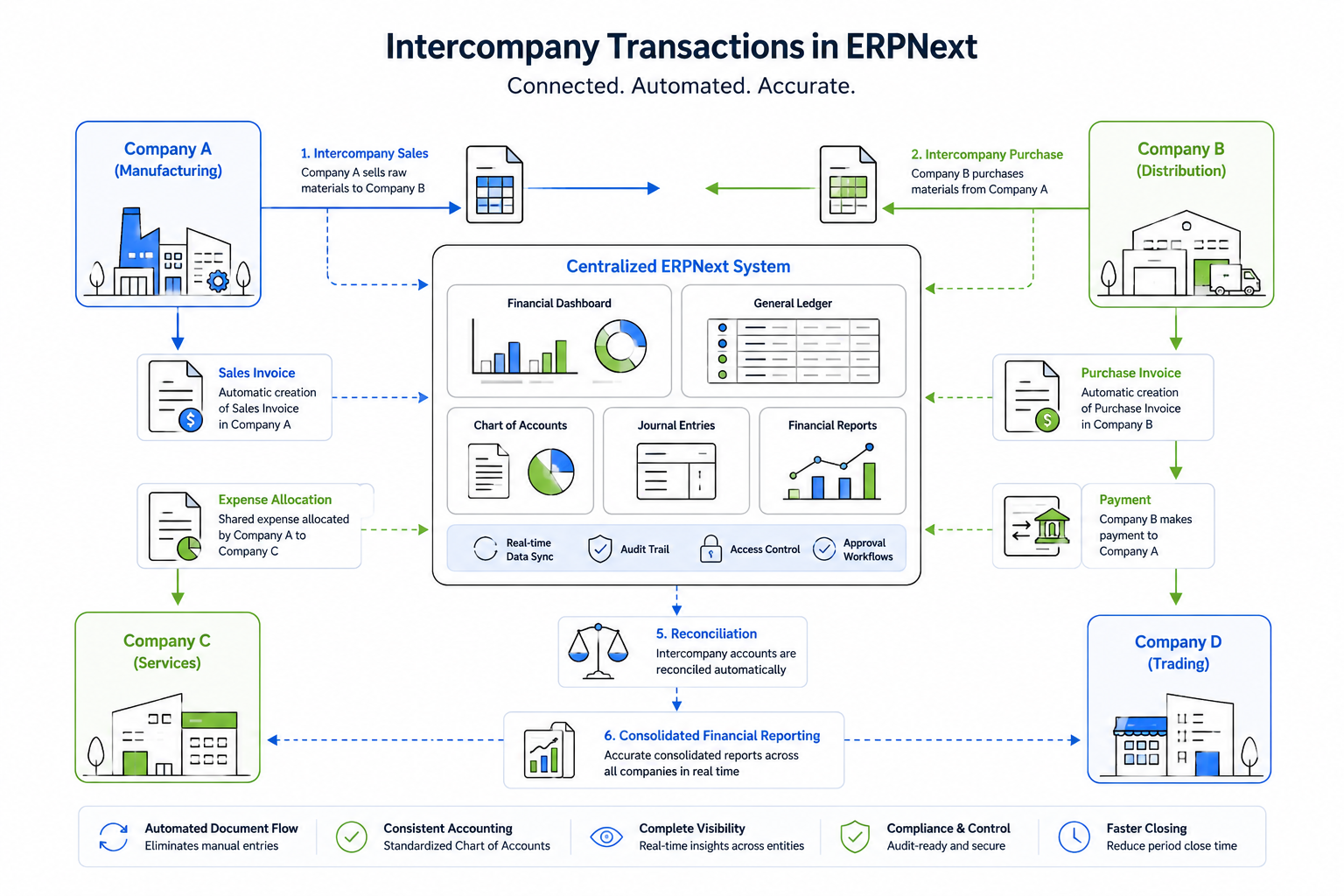
A few core capabilities make this manageable:
Shared Customers and Suppliers
A customer or supplier master can be linked across companies, so you're not recreating the same contact record for every entity that deals with them.
Intercompany Sales and Purchases
When one company sells to another, ERPNext lets you create a Sales Invoice in the selling company and generate a corresponding Purchase Invoice in the buying company directly from it, provided the Internal Customer and Internal Supplier settings are configured on the respective party masters.
This avoids re-entering the same transaction twice.
Expense Allocation
Shared costs, like a group-level office lease or an administrative team, can be recorded and distributed across companies using Journal Entries against the appropriate Cost Centers instead of sitting entirely in one entity's books.
Journal Entries for Adjustments
For anything outside the standard sales or purchase flow—write-offs, corrections, or internal transfers—Journal Entries help keep both sides of the transaction accurate.
Note: Internal Customer/Supplier linkage requires proper configuration. It doesn't activate automatically when you create multiple companies. The master data must be configured correctly from the beginning.
Best Practices for Managing Intercompany Transactions
After implementing ERPNext across manufacturing and distribution groups, these practices consistently separate clean financial records from constant firefighting.
- Standardize your company structure early by mapping ERPNext companies to your actual legal entities before creating transactions.
- Define intercompany workflows on paper first—identify who creates invoices and who approves them before configuring ERPNext.
- Maintain a consistent Chart of Accounts across companies wherever accounting policies allow.
- Use the Internal Customer/Internal Supplier setup to generate corresponding transactions instead of entering them manually.
- Apply Approval Workflows on intercompany invoices.
- Reconcile regularly—not just during month-end closing.
- Use Role-Based Permissions so only authorized users can create or approve transactions.
- Perform periodic audits of intercompany balances.
- Review ERPNext reports such as:
- Consolidated Financial Statement
- Company-wise Trial Balance
These reports help identify discrepancies before they become larger issues.
Common Mistakes Businesses Make
A distribution business transferring inventory between two legal entities is a good example of where these mistakes often appear.
- Duplicate data entry – Users manually create both sides of a transaction instead of using internal party linkage.
- Different account structures – Companies maintain inconsistent Charts of Accounts, making consolidation difficult.
- Manual journal adjustments – Teams fix numbers outside standard workflows, weakening the audit trail.
- Missing approvals – Transactions are posted without proper review.
- Poor master data – Customers and suppliers are not correctly configured as internal parties.
- Late reconciliation – Mismatches are discovered only during year-end audits, making root-cause analysis much harder.
Business Benefits of Getting This Right
When intercompany processes are configured correctly, businesses begin seeing improvements almost immediately.
- Faster month-end closing because fewer transactions require manual matching.
- Better financial visibility across the entire business group.
- Reduced manual work by eliminating duplicate data entry.
- Improved compliance with a complete audit trail for every transaction.
- More accurate and timely financial reporting.
- Better decision-making based on reliable consolidated financial information.
Why Proper ERPNext Implementation Matters
Most intercompany accounting issues don't come from ERPNext itself. They usually result from how the multi-company structure was designed.
For example:
- A Chart of Accounts that wasn't planned for consolidated reporting.
- Internal Customers and Suppliers that were never configured.
- Approval workflows that don't reflect the organization's finance process.
These issues create reconciliation challenges regardless of which ERP system is being used.
This is why many businesses work with experienced ERPNext implementation partners such as Tridots Tech to design their company structure, financial hierarchy, and approval workflows before live transactions begin.
Conclusion
Intercompany Transactions in ERPNext aren't complicated in theory. The real complexity comes from inconsistent setup, manual workarounds, and reconciliation that's left until month-end.
With a standardized company structure, properly configured Internal Customers and Suppliers, and clearly defined workflows, much of that friction disappears.
If your finance team is still matching intercompany entries manually every month, it's often a sign that the underlying ERP setup needs another look—not that the process itself has to remain difficult.
No comments yet. Login to start a new discussion Start a new discussion