Why ERPNext Order Fulfillment Gets Delayed: 7 Process Gaps to Check
Discover seven process gaps that delay ERPNext order fulfillment and learn how to improve inventory accuracy, warehouse coordination, and on-time deliveries.
Why ERPNext Order Fulfillment Gets Delayed: 7 Process Gaps to Check
A customer places an order, the sales team confirms the delivery date, and everyone expects the goods to leave the warehouse on time. But when dispatch day arrives, the team discovers that stock is missing, purchasing has not been completed, or the warehouse is still preparing the order.
These situations can affect customer trust, repeat business, and daily operations. Even businesses using ERP software can experience order processing delays when their internal processes are not properly managed.
ERPNext order fulfillment depends on more than recording a Sales Order. Stock accuracy, purchasing decisions, warehouse coordination, production schedules, and communication between teams all influence how quickly an order reaches the customer.
Understanding the process gaps behind these delays can help businesses identify what needs to change and make better use of ERPNext.
What Is Order Fulfillment, and Where Can Delays Begin?
Order fulfillment is the process of handling a customer order from confirmation to dispatch and delivery. Depending on the business, it may involve checking stock, purchasing materials, manufacturing products, picking and packing items, preparing delivery documents, and issuing an invoice.
ERPNext supports these activities through documents such as the Sales Order, Pick List where applicable, Delivery Note, and Sales Invoice. Manufacturing businesses may also use Work Orders, Job Cards, and quality inspection processes.
However, creating these documents does not automatically guarantee timely delivery. A delay at any stage can hold up the entire order, even when the sales team has entered the details correctly.
7 Process Gaps That Can Delay ERPNext Order Fulfillment
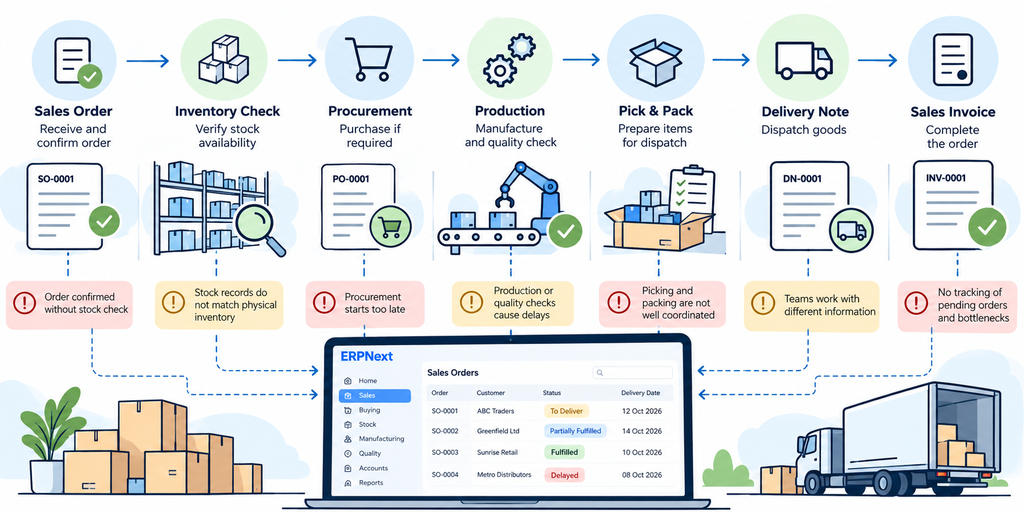
1. Sales Orders Are Confirmed Before Stock Is Properly Checked
A sales representative receives an order for 100 units and promises delivery within two days. Later, the warehouse discovers that only 65 units are available for dispatch.
The sales team may have relied on an outdated spreadsheet, misunderstood the stock position, or overlooked quantities already committed to other orders. The result is a delivery promise that the business cannot meet.
ERPNext inventory management helps teams review stock balances and warehouse-level availability. When sales workflows include appropriate stock checks, employees can make better-informed delivery commitments.
What to check: Before confirming a delivery date, verify the required quantity, the relevant warehouse, and the stock available for the order. If the full quantity is unavailable, agree on a realistic delivery date or a partial delivery plan with the customer.
2. Inventory Records Do Not Match Physical Stock
Sometimes, ERPNext shows 50 units in stock, but the warehouse team can locate only 35. Perhaps some items were moved without recording the transaction, goods were damaged, or a stock entry was completed late.
This difference between recorded and physical stock creates problems during picking and packing. Employees spend time searching for items, checking other storage locations, or informing sales that the order cannot be completed.
ERPNext stock management provides records of inventory movements and balances. Stock Entry and stock reconciliation can help businesses record movements and investigate discrepancies, depending on the transaction involved.
What to check: Record stock movements promptly, review unusual differences, and perform physical stock checks at suitable intervals. Accurate inventory depends on employees following the agreed process consistently.
3. Warehouse Picking and Packing Are Not Well Coordinated
Having stock in the system does not mean the warehouse can prepare an order immediately. Products may be stored in different locations, picking instructions may be unclear, or the dispatch team may not know which orders need priority.
For example, a distributor has 40 units of a product spread across three warehouse locations. The stock is available, but the warehouse employee spends time locating the items because the picking process does not clearly identify where to collect them.
ERPNext warehouse management can help teams work with warehouse-level stock information. Where supported by the business's configuration and ERPNext version, Pick Lists can help organize the items and quantities to be picked.
What to check: Define picking responsibilities, maintain accurate warehouse locations, and establish a clear process for prioritizing orders. Configure ERPNext to reflect how the warehouse actually operates rather than expecting employees to work around an unsuitable setup.
4. Procurement Starts Too Late When Stock Is Insufficient
When a business runs short of stock, purchasing needs to begin early enough to account for supplier lead times, approval procedures, and delivery schedules. If the purchasing team learns about the shortage only when an order is due for dispatch, the customer may have to wait.
Consider a retailer that receives an order for 200 units but has only 120 available. The remaining quantity must be purchased, and the supplier needs five working days to deliver it. A two-day customer commitment is no longer realistic.
ERPNext buying workflows, Material Requests, Purchase Orders, and material requirements planning where appropriate can help businesses identify purchasing needs and follow procurement progress.
What to check: Review replenishment requirements regularly, monitor outstanding purchase orders, and communicate supplier lead times to the sales team before confirming delivery dates.
5. Production or Quality Checks Hold Up Ready-to-Ship Orders
For manufacturers, a confirmed sales order is only one part of the delivery process. Raw materials must be available, production must be completed, and required quality checks must be passed before goods are ready to dispatch.
For example, a company receives an order for 500 finished components. The sales order is confirmed, but production is delayed because a component is unavailable. Even after manufacturing is completed, the goods may still need inspection before release.
ERPNext manufacturing workflows can help teams plan and record production activities through relevant documents such as Work Orders and Job Cards. Quality inspection processes can also be used where applicable to record inspection results.
What to check: Review production readiness before promising dispatch dates. Identify material shortages, incomplete production activities, and pending inspections early. Businesses that only distribute finished goods may not need manufacturing workflows, but they still need a clear process for handling inspection or approval requirements.
6. Sales, Warehouse, and Dispatch Teams Work With Different Information
A delivery date changes, but only the sales team knows about it. The warehouse continues preparing orders according to the original schedule, while the dispatch team follows an outdated priority list.
This can happen when employees rely on separate spreadsheets, phone calls, or messages instead of updating the relevant order records.
ERPNext order management gives teams a shared place to record customer orders and related transactions. However, its usefulness depends on employees updating information promptly, having appropriate access, and following agreed responsibilities.
What to check: Decide who can update delivery dates, quantities, and dispatch priorities. Make sure changes are recorded in the relevant ERPNext documents and communicated to the people responsible for the next step.
7. Nobody Tracks Pending Orders and Fulfillment Bottlenecks
Some businesses spend most of their time processing new orders while older orders remain pending. Without a regular review, nobody may notice that a shipment has been waiting for purchasing approval or that a partially fulfilled order still has an outstanding quantity.
ERPNext order tracking can support this review through relevant document statuses, list views, reports, and dashboards. Additional alerts or tailored reports may require configuration or customization, depending on the information the business needs.
What to check: Review pending orders daily or at an appropriate frequency. Assign an owner to each delayed order, record the reason for the delay, and agree on the next action. Over time, these records can reveal recurring problems, such as supplier delays or warehouse capacity issues.
How to Identify and Reduce Order Fulfillment Delays in ERPNext
Businesses do not always need a new system to improve delivery performance. Often, they need a clearer view of where orders are getting held up.
Start with these practical steps:
- Review open Sales Orders: Identify outstanding quantities and expected delivery dates.
- Verify inventory: Compare ERPNext stock balances with physical stock and investigate discrepancies.
- Locate the bottleneck: Determine whether each delayed order is waiting for purchasing, production, picking, inspection, or dispatch.
- Assign responsibility: Give every pending order an owner and a clear next action.
- Record delay reasons: Track recurring issues instead of treating every late order as an isolated incident.
- Review workflows: Check whether ERPNext reflects the actual order fulfillment process.
- Train employees: Ensure employees know when and how to record stock movements, order changes, and delivery transactions.
These steps help businesses understand how to reduce order fulfillment delays without assuming that software alone will solve every operational problem.
When Do You Need ERPNext Customization or Implementation Support?
If orders continue to be delayed despite regular reviews, the problem may lie in the system configuration, incomplete data, unsuitable workflows, or a lack of employee training.
An experienced ERPNext implementation partner can review the order-to-delivery process, identify where work is getting held up, and configure appropriate workflows. ERPNext customization may be useful when standard functionality does not meet a genuine business requirement.
As a Frappe Gold Partner, Tridots Tech helps businesses implement and customize ERPNext around their operational requirements. Reviewing your existing order management, inventory, and warehouse processes can help determine whether the issue needs better procedures, configuration changes, or additional development.
Frequently Asked Questions
1. Why do order fulfillment delays happen in ERPNext?
Common causes include inaccurate stock records, late purchasing, poorly coordinated warehouse activities, production delays, and incomplete communication between teams. ERPNext can help identify these issues when transactions and workflows are maintained properly.
2. How does ERPNext help track pending customer orders?
Businesses can review Sales Orders, delivery information, outstanding quantities, and relevant document statuses. Reports and dashboards can provide additional visibility depending on the configured system.
3. Can ERPNext prevent stock-related delivery delays?
ERPNext can help teams monitor inventory and plan replenishment, but it cannot guarantee stock availability. Accurate records, timely transactions, and appropriate purchasing procedures remain essential.
4. Which ERPNext documents are involved in order fulfillment?
Common documents include Sales Order, Pick List where applicable, Delivery Note, and Sales Invoice. Manufacturing businesses may also use Work Orders, Job Cards, and quality inspection documents.
5. When does a business need ERPNext customization for order management?
Customization may be appropriate when a business has specific approval rules, reporting requirements, or operational workflows that standard configuration cannot adequately support. Review standard options first to avoid unnecessary development.
Conclusion
Delayed deliveries are not always caused by a lack of stock or slow warehouse employees. Sometimes, the real problem is a purchasing decision made too late, an inaccurate inventory record, or an order that nobody is monitoring.
Effective ERPNext order fulfillment requires accurate data, realistic delivery commitments, clear responsibilities, and regular reviews of pending orders. When these processes work together, businesses can identify delays earlier and make better decisions about customer commitments.
If your business is experiencing recurring order fulfillment problems, Tridots Tech, a Frappe Gold Partner, can help you assess your ERPNext setup and identify practical improvements to your order management process.
No comments yet. Login to start a new discussion Start a new discussion