How ERPNext Handles GST, TDS & Tax Accounting
Managing GST and TDS gets harder as a business grows. See how ERPNext connects tax calculations, accounting, invoices, and compliance in one workflow.
How ERPNext Handles GST, TDS, and Tax Accounting
For a growing Indian business, tax accounting rarely stays as simple as recording a sales invoice and moving on. As the number of customers, suppliers, purchases, and sales increases, finance teams have to keep track of GST, TDS, tax accounts, invoices, payments, and reporting requirements at the same time. When these activities are managed across spreadsheets, accounting software, and separate records, even a small error can take time to identify and correct.
This is where ERPNext GST accounting can make a practical difference. ERPNext allows businesses to configure tax templates, tax accounts, tax rules, and tax withholding within their accounting processes. For Indian businesses, the India Compliance app extends ERPNext with features related to GST, TDS, e-Invoicing, e-Way Bills, and other India-specific compliance requirements.
But the real question for a business is not simply whether ERPNext supports GST or TDS. It is how these taxes are handled during everyday transactions and how that information reaches the accounting records.
Why GST and TDS Become Difficult as a Business Grows
Consider a manufacturing company that purchases raw materials from multiple suppliers and sells finished products to customers across different locations. The finance team may have to deal with different tax treatments, GSTIN details, input and output GST, TDS deductions, tax ledgers, payments, and regular reconciliation. Managing each transaction correctly becomes increasingly difficult when the information is maintained in different places.
The challenge is not just calculating a tax percentage. The finance team also needs to ensure that the tax is associated with the correct transaction and the correct accounting account. If a purchase invoice is entered with the wrong tax treatment, the mistake can affect the accounting records and may only become visible during reconciliation or reporting.
ERPNext brings the tax configuration closer to the sales, purchase, and accounting transactions. Instead of treating tax as a separate calculation, the system can apply configured tax information as part of the transaction workflow. This can give finance teams a clearer connection between the original invoice and the resulting accounting entries.
How ERPNext Handles GST
ERPNext uses tax templates and tax accounts to calculate and record taxes on sales and purchase transactions. Businesses can configure Sales Taxes and Charges Templates for sales transactions and Purchase Taxes and Charges Templates for purchases. Where different items require different tax treatments, Item Tax Templates can also be used.
For Indian businesses, GST-related information such as GSTIN, HSN/SAC details, GST accounts, and applicable tax configurations can be maintained as part of the India-specific setup. Once the appropriate configuration is in place, the tax treatment can be applied to relevant transactions instead of being calculated manually every time.
A Simple Example
Suppose a company sells goods worth ₹1,00,000 and, for illustration, an 18% GST rate applies to that transaction. The GST amount would be ₹18,000, making the invoice value ₹1,18,000.
The important point is not only the calculation of ₹18,000. The tax amount also needs to be recorded against the appropriate tax account so that the transaction contributes correctly to the company's accounting records. In ERPNext, the configured tax template determines how the applicable tax is calculated and where the tax amount is accounted for.
The actual GST rate and treatment will depend on the nature of the goods or services, place of supply, transaction details, and applicable tax rules. The example above is only intended to explain the accounting flow.
Managing Input GST and Output GST in ERPNext
One of the basic concepts businesses need to understand when managing GST in ERPNext is the difference between input and output GST. Input GST generally refers to GST paid on eligible business purchases, while output GST refers to GST collected from customers on taxable sales.
For example, a manufacturing company may purchase raw materials from a supplier and pay applicable GST on that purchase. Later, when the company sells its finished products, it charges GST to its customers. These two sides of the transaction have different accounting implications and need to be tracked appropriately.
ERPNext's India-specific tax configuration provides separate GST accounts for input and output tax, along with other applicable GST accounts. This helps the finance team distinguish between tax paid on purchases and tax collected through sales transactions instead of treating all GST amounts as one figure.
How ERPNext Handles TDS
GST and TDS are often discussed together because both appear in business transactions, but they serve different purposes. TDS, or Tax Deducted at Source, involves deducting tax from certain payments when the applicable conditions are met. For businesses, this means the amount recorded on a supplier invoice and the amount ultimately paid to the supplier may need to be accounted for differently.
ERPNext supports tax withholding through Tax Withholding Categories. A withholding category can be configured with the applicable withholding rate, thresholds, and the account where the withheld amount should be recorded. The category can also be associated with a supplier so that the appropriate withholding setup can be applied to relevant transactions.
A Practical Example
Imagine a company receives an invoice of ₹50,000 from a consultant for professional services. If TDS applies to that transaction, the company may need to deduct the applicable TDS before making the payment to the consultant.
The accounting flow would therefore consider the gross invoice amount, the applicable TDS deduction, and the net amount payable to the consultant. The deducted amount is recorded as a TDS liability rather than being treated as part of the amount paid directly to the supplier.
The actual TDS rate, threshold, section, and applicability depend on the relevant tax provisions and the circumstances of the transaction. These should be validated based on the current applicable rules rather than assumed during ERP configuration.
GST and TDS in the Same Transaction
This is where tax accounting can become confusing for businesses. A service provider may issue an invoice that includes GST, while the customer may also need to deduct TDS from the applicable payment. GST and TDS are not interchangeable, and they need to be accounted for according to their respective rules.
Consider a company receiving a professional service invoice. The invoice may contain the service value and applicable GST, while the business may separately need to account for TDS based on the nature of the service and applicable provisions. The final payment to the supplier therefore needs to reflect the appropriate accounting treatment for both.
With the right configuration, ERPNext can maintain the relevant tax information within the supplier transaction and create the corresponding accounting impact. This is particularly useful for businesses that make regular payments to consultants, contractors, agencies, and other service providers.
So, how does this tax information come together in ERPNext?
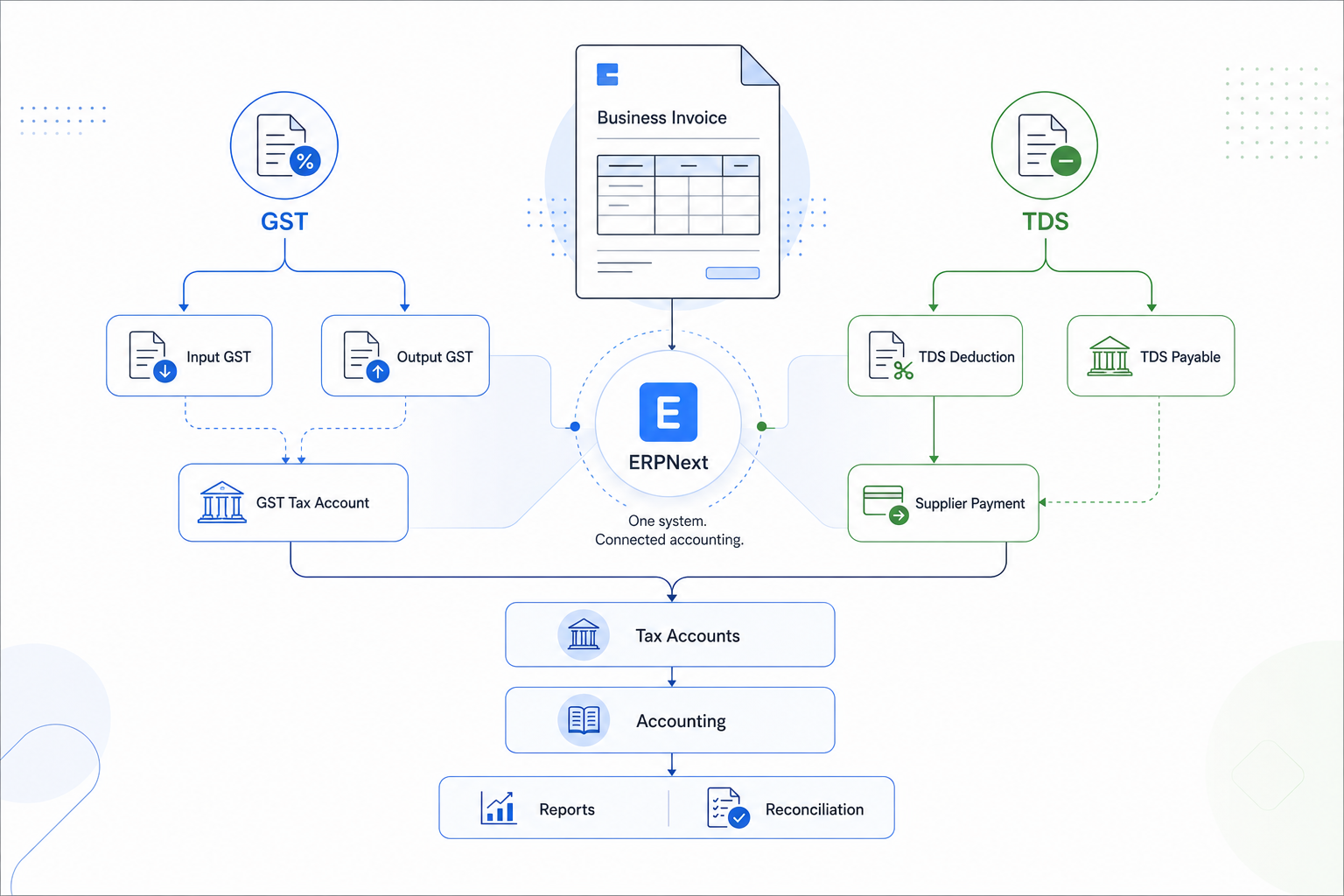
Tax Accounting in ERPNext Is More Than Calculating Tax
It is easy to think of tax management as simply calculating a percentage on an invoice. In practice, the accounting side is equally important. The tax amount needs to reach the appropriate ledger account, remain connected to the underlying transaction, and be available when the finance team reviews payments, liabilities, reports, or reconciliations.
In ERPNext, tax templates can be linked to specific tax accounts. This allows tax amounts to be recorded against the relevant account when a transaction is submitted. The system can also support different tax calculation methods depending on how the business has configured its tax structure.
For Indian businesses, the India Compliance app provides additional GST-related capabilities, including GST reports and other India-specific compliance workflows. This creates a more connected flow from the original transaction to the accounting and reporting information that finance teams need to review.
What Should Be Configured Before Using ERPNext for GST and TDS?
Installing ERPNext does not automatically make a company's tax accounting setup ready for use. The system needs to be configured around the company's actual accounting structure, products or services, customers, suppliers, and tax requirements.
Before going live, businesses should review areas such as:
- Company and GSTIN details
- Customer and supplier GSTIN information
- HSN/SAC details
- GST accounts
- Sales and purchase tax templates
- Item tax configuration
- TDS withholding categories
- TDS payable accounts
- Chart of Accounts
- Relevant reports and compliance requirements
Testing is equally important. A business should test common transactions such as purchases, sales, credit notes, supplier payments, and applicable withholding scenarios before relying on the system for day-to-day accounting.
A Practical ERPNext Tax Accounting Flow
Consider a manufacturing company using ERPNext for its regular operations. The company first purchases raw materials and records the applicable GST through its purchase transaction. The purchase-side tax is then reflected in the relevant tax account based on the configured setup.
The company later sells finished goods to its customers. The sales invoice applies the configured GST treatment and records the corresponding output tax. The finance team can then review these transactions as part of its accounting and tax reporting process.
The same company may also purchase professional services from an external consultant. If TDS is applicable, the supplier transaction can use the configured Tax Withholding Category. The TDS amount is accounted for separately, while the remaining amount is considered when recording the supplier payment.
This is the practical value of having tax accounting within the ERP system. The finance team does not have to treat GST, TDS, invoices, and accounting entries as completely separate activities. They become connected parts of the same transaction flow.
Is ERPNext Suitable for GST and TDS Management?
For Indian businesses, ERPNext can support GST and TDS-related accounting workflows when it is configured appropriately and the relevant India-specific functionality is used. It can support areas such as GST accounts, tax templates, GST-related transaction information, tax withholding, and applicable reporting workflows.
However, ERPNext should not be viewed as a replacement for accounting or tax expertise. The system applies the configuration provided to it. If the tax accounts, master data, tax templates, withholding categories, or business rules are incorrect, the resulting transactions may also be incorrect.
That is why implementation and configuration matter. Businesses should regularly review their tax setup and validate it against current regulations with their accountant or tax professional, especially when tax rules or compliance requirements change.
Why ERPNext Implementation Matters for Tax Accounting
Tax accounting is one area where the quality of an ERP implementation can have a direct impact on everyday finance operations. Simply installing ERPNext is not enough. The system needs to reflect how the business actually buys, sells, pays suppliers, collects money, and records taxes.
An implementation partner can help map the company's accounting structure, configure tax accounts and templates, review customer and supplier data, set up relevant workflows, migrate required information, and test transactions before go-live. This reduces the chances of discovering configuration issues only after the system is already being used for daily accounting.
Tridots Tech is a Frappe Gold Partner and ERPNext implementation partner, helping businesses configure ERPNext around their actual business and accounting processes. The focus is not simply on making the software work, but on making sure the setup makes sense for the people who will use it every day.
Conclusion
GST and TDS are not simply numbers added to an invoice. They affect purchases, sales, supplier payments, accounting entries, tax liabilities, and financial reporting. As a business grows, keeping these processes connected becomes increasingly important.
ERPNext can bring GST, TDS, and tax accounting into a common business system, provided the configuration, master data, accounting structure, and workflows are set up correctly. For Indian businesses, the India-specific compliance capabilities can further support GST and TDS-related processes.
The key is to look beyond the tax calculation itself. A well-configured ERPNext system should make it easier for finance teams to understand where the tax came from, how it was accounted for, and how it connects back to the original business transaction.
If you are planning an ERPNext implementation or reviewing your existing tax accounting setup, Tridots Tech can help you assess your requirements and configure ERPNext around your business processes.
No comments yet. Login to start a new discussion Start a new discussion