Frappe Framework DocType Explained: Concepts, Examples & ERPNext Customization
Understand Frappe Framework DocTypes, Documents, and DocFields with practical examples and learn how they support ERPNext customization.
Frappe Framework DocType Explained: Concepts, Examples & ERPNext Customization
If you have used ERPNext, you have probably worked with screens such as Customer, Supplier, Item, Employee, Sales Invoice, or Project. To a business user, these may simply look like different forms for entering and managing information. Behind these screens is one of the core concepts of the Frappe Framework: the DocType.
A DocType is a fundamental building block of a Frappe application. It defines the structure of a particular type of record, including its fields, metadata, naming, and other properties that determine how the record is managed within the application. Since ERPNext is built on the Frappe Framework, DocTypes are used throughout the system to represent business information and transactions. Understanding DocTypes makes it easier to understand how ERPNext works and how it can be adapted to different business processes.
What Is a DocType in Frappe Framework?
In simple terms, a DocType defines the structure and characteristics of a particular type of record in a Frappe application. It tells the application what information needs to be stored and how that information should be structured and managed.
For example, imagine a company that wants to maintain customer information. The business may need to record the customer's name, contact details, customer group, territory, payment terms, and other relevant information. Instead of creating a completely separate structure for handling this information, Frappe provides the DocType concept to define how these records should work.
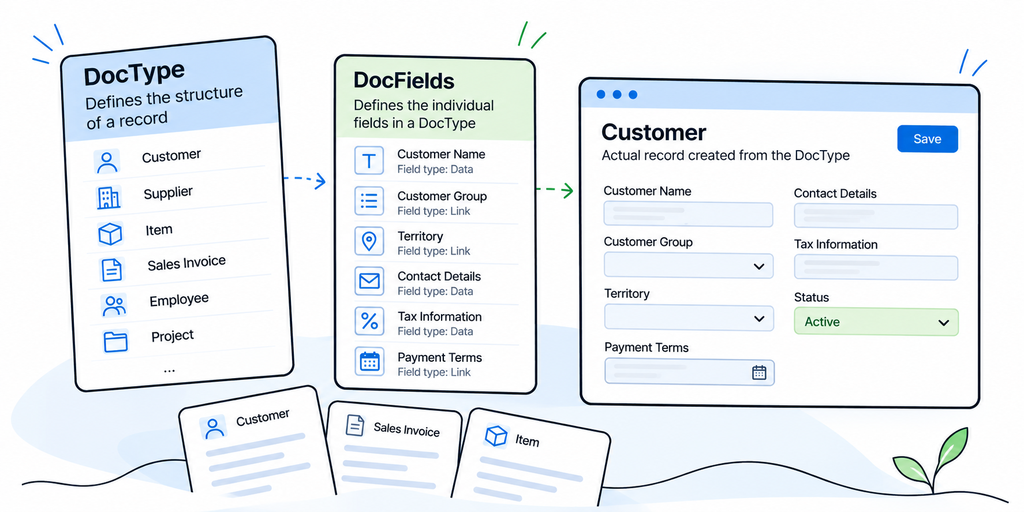
A DocType can contain different fields, field types, relationships, labels, and other metadata that describe the structure of the record. When a user creates an actual record using that structure, the resulting record is called a Document.
A simple way to understand the relationship is this: the DocType defines what a record should contain and how it should work, while the Document is the actual record created from that definition.
This distinction becomes important when working with ERPNext because almost every business process involves creating, viewing, updating, or processing Documents based on defined DocTypes.
How DocTypes Work in ERPNext
To understand DocTypes properly, it helps to understand the relationship between Frappe Framework and ERPNext. Frappe Framework is the underlying web application framework, while ERPNext is a business application built using that framework. Frappe provides the foundation, and ERPNext uses that foundation to provide functionality for areas such as accounting, sales, purchasing, inventory, manufacturing, human resources, projects, and other business processes.
When you use ERPNext, you regularly work with records that are based on DocTypes. For instance, Customer is used to manage customer information, Supplier is used for supplier-related records, Item represents products or services, Sales Invoice represents sales billing information, and Employee is used to manage employee records.
From the user's perspective, these are simply different screens in ERPNext. From the Frappe Framework perspective, they are structured records based on DocTypes. This is one reason Frappe provides a consistent foundation for building and customizing business applications.
What Is a DocField?
A DocType is made up of individual fields, and these fields are defined through DocFields. A DocField represents an individual property within a DocType and determines what type of information can be stored in that field.
For example, a Customer DocType may contain fields for customer name, customer group, territory, customer type, tax information, and contact details. Each field has its own configuration and purpose.
Understanding this relationship makes the structure easier to visualize: the DocType defines the overall record structure, DocFields define the individual fields within that structure, and Documents contain the actual business information.
This structure allows businesses to capture information consistently instead of relying on different employees to record the same type of information in different formats.
A Real-World Example of a DocType
Consider a company that receives customer support requests every day. Initially, employees may manage these requests through emails or spreadsheets. As the number of requests grows, it becomes difficult to know which employee is handling an issue, what its current status is, and whether the problem has been resolved.
The company could create a Customer Support Request DocType specifically for this process. The DocType could contain information such as the customer, issue description, priority, assigned employee, status, and resolution details.
When a support employee creates a new request, that information becomes a structured record that can be updated as the issue moves through the company's support process.
The important part is not simply the form itself. The DocType provides a consistent structure for capturing information that is important to the business.
For example, instead of one employee recording a support issue as "Customer called regarding a product problem" while another writes something completely different, the company can define specific fields for the information it needs. This makes the data easier to manage, search, report on, and use later.
DocType vs Database Table vs Form
One common question among people who are new to Frappe Framework is whether a DocType is simply a database table. There is a relationship between the two, but a DocType should not be thought of as only a database table.
A database table primarily deals with storing data. A DocType goes further by defining metadata about that data and how it is represented within the Frappe application. The fields, field types, labels, permissions, and other properties help define the structure of the Document and how users interact with it.
A DocType should also not be confused with a form. The form is what the user sees and interacts with, while the DocType defines the underlying structure and metadata that support that interaction.
For someone learning Frappe Framework, this distinction is useful because it changes the way you think about customization. You are not simply designing another screen. You are defining or extending a structured business record that the application can work with.
Standard DocTypes vs Custom DocTypes
ERPNext already provides many standard DocTypes for common business requirements. Customer, Supplier, Item, Sales Order, Sales Invoice, Employee, and many other records are already part of the application.
However, businesses do not always operate in exactly the same way. A manufacturing company, for example, may use standard ERPNext records for its customers, suppliers, items, and sales transactions but still have a business process that is unique to its operations.
Suppose the company wants to track machine maintenance requests. The process may require information about which machine needs maintenance, the type of maintenance required, who reported the issue, when it was reported, its priority, its current status, and the technician responsible for handling it.
In such a situation, a custom DocType in ERPNext may be useful. It allows the business to represent information that is specific to its own process while keeping that information structured within the application.
This is where understanding the business requirement becomes important. Not every requirement needs a new DocType, and creating a custom DocType should not automatically be the first approach.
When Should a Business Create a Custom DocType?
Creating a custom DocType should not automatically be the first solution whenever a business wants to change ERPNext.
The first question should be whether the existing ERPNext functionality can already support the requirement. In some situations, a business may only need an additional field on an existing record. In another situation, a workflow, report, permission configuration, or other customization may be enough.
For example, if a company simply wants to record a customer's internal reference number, creating an entirely new DocType would probably be unnecessary. Adding an appropriate custom field to the existing Customer structure may be a more suitable approach.
A custom DocType becomes more relevant when the business has a distinct type of information or process that does not fit naturally into the existing structures.
This is why understanding the actual business requirement should come before deciding on a technical solution.
How DocTypes Support ERPNext Customization
DocTypes form an important part of the bigger ERPNext customization picture.
When a company wants to customize ERPNext, the requirement may involve additional fields, workflows, permissions, reports, integrations, or custom logic. The appropriate approach depends on what the business is trying to achieve.
For example, a company may have an existing ERPNext record but need additional information to support an internal process. In that situation, extending the existing structure may be enough. Another company may have a completely separate business process that requires its own structured records.
For developers working with Frappe Framework, understanding DocTypes is particularly important because Documents are central to how applications built with Frappe manage business data. Developers can work with these Documents through the framework's APIs and build application logic around them.
For business users, the technical details may not be necessary. What matters is understanding that DocTypes provide the structure that allows business information to be consistently captured and managed.
From a Business Requirement to a DocType
Consider an IT department that wants to keep track of equipment issued to employees.
The requirement sounds simple: the company wants to know which laptop or other equipment has been given to which employee, when it was issued, and whether it has been returned.
Instead of immediately thinking about development, the requirement can first be broken down into the information the business needs. An equipment allocation structure might contain the employee, equipment, issue date, return date, status, and relevant remarks.
The resulting process can be understood as:
Business requirement → Information required → DocType structure → Individual Document → Business process
This way of thinking is useful because it connects the technical structure with the actual business requirement. The developer understands what needs to be built, while the business team can clearly explain what information it needs to manage.
When Should You Use Standard ERPNext Features Instead of Custom Development?
One of the most important decisions during an ERPNext implementation is knowing when to use the standard system and when customization is actually necessary.
Customization should solve a genuine business requirement rather than simply changing the system because a screen looks different from what someone expects.
A practical approach is to first understand what ERPNext already provides. From there, the implementation team can evaluate configuration options, custom fields, workflows, reports, integrations, permissions, and other available approaches. Only when those options do not adequately address the requirement should deeper custom development be considered.
This approach can help businesses maintain a system that is easier to understand and manage while still adapting ERPNext to their actual processes.
Why Understanding DocTypes Matters
You do not need to be a developer to understand the basic idea behind Frappe Framework DocTypes.
For an ERPNext user, understanding DocTypes provides a clearer picture of what is happening behind the forms used every day. For an implementation consultant, it helps translate business requirements into system requirements. For a developer, DocTypes are one of the fundamental concepts used when building and customizing applications with Frappe Framework.
The key idea is simple: a DocType defines the structure and characteristics of a particular type of record, while a Document represents an actual record created from that structure.
Once this relationship becomes clear, concepts such as standard DocTypes, custom DocTypes, ERPNext customization, and Frappe development become much easier to understand.
For businesses planning an ERPNext implementation or customization project, having this basic understanding can also make discussions with implementation and development teams more productive. As a Frappe Gold Partner, Tridots Tech helps businesses approach ERPNext implementation, customization, integration, development, and support based on their specific requirements.
Final Thoughts
DocTypes may initially seem like a technical concept, but they are closely connected to the everyday business processes managed in ERPNext. Whether you are managing customers, processing sales transactions, tracking inventory, maintaining employee records, or building a business-specific process, DocTypes provide the structure needed to organize that information.
Understanding the relationship between DocTypes, DocFields, and Documents gives both business users and technical teams a clearer picture of how Frappe applications work. It also helps businesses make better decisions about when standard ERPNext functionality is sufficient and when customization may be required.
If your business is planning an ERPNext implementation, customization, or integration, Tridots Tech, a Frappe Gold Partner, can help you evaluate your requirements and build an ERPNext solution around your business processes.
No comments yet. Login to start a new discussion Start a new discussion