How ERPNext Handles Document Naming, Naming Series, and Numbering
Every invoice, order, and quotation needs an identity. Learn how ERPNext naming series work and how businesses can create clear, practical document numbering.
How ERPNext Handles Document Naming, Series, and Numbering
Ask your finance team for the invoice number of a recent customer order, and they probably won't want to hear, “Give me a minute, I'll check.”A document number should make that search easier.Something like INV-2026-00124 immediately looks like an invoice. PO-2026-00451 looks like a purchase order. Even before opening the record, your team has some context about what they are looking at.
This is where ERPNext document naming becomes useful. ERPNext can generate names for documents using configurable naming series, allowing businesses to create numbering patterns that fit their processes.It may sound like a small ERP setting, but when a business creates hundreds or thousands of transactions, having a clear naming structure can make everyday work much easier.
What Is Document Naming in ERPNext?
Every record created in ERPNext needs an identifiable name. Depending on the document and its configuration, that name can be based on a naming series, a field value, or another naming method supported by the system.For business users, the simplest example is a transaction number.
Think about the documents your team creates every day:
- Sales Quotations
- Sales Orders
- Sales Invoices
- Purchase Orders
- Purchase Invoices
- Delivery Notes
If these records are given clear and consistent numbers, people can refer to them easily.
For example, a salesperson might tell the accounts team, “Please check SINV-2026-00341,” instead of describing the customer, order date, amount, and other details just to locate the right record.That is the practical side of document naming in ERPNext.It gives records an identity that people and the system can use to distinguish one document from another.
What Is an ERPNext Naming Series?
A naming series is essentially a numbering pattern that ERPNext follows when creating documents.
A simple way to think about it is this:
A naming series gives each type of document its own numbering lane.
For example, a business might configure patterns such as:
Sales Invoice: INV-.YYYY.-.#####
Purchase Order: PO-.YYYY.-.#####
Quotation: QTN-.YYYY.-.#####
ERPNext supports prefixes and series patterns, and businesses can define multiple naming series for transactions. The system's Naming Series settings allow administrators to configure available series and, where appropriate, let users select a series when creating a document.The exact format is a business decision.
A company may want a short prefix such as INV, while another may have a longer internal convention. The important part is that the format is easy for the people using it to understand and maintain.
How Does ERPNext Generate Document Numbers?
The process is fairly straightforward.
Suppose a company has configured a Sales Invoice series that produces numbers in this format:
INV-2026-00001
When the first invoice is created, ERPNext assigns the next number in that series.
The following invoices may then be:
INV-2026-00002
INV-2026-00003
and so on.
The actual pattern depends on the naming series configured for that document.
ERPNext also supports year-based naming. For example, the naming series can include YYYY for the calendar year or FY when the business wants the series to reflect the current financial year.This can be useful for businesses that prefer their document numbers to make the period immediately visible.
For example:
INV-2026-00452
is easier to interpret at a glance than a completely generic sequence when teams are working with records from multiple years.
Why Do Businesses Use Different Naming Series?
Imagine a company that uses one general sequence for every transaction:
00101 00102 00103 00104
Now someone asks for purchase order 00103.
The number alone doesn't tell you much.
A more descriptive structure could look like this:
Quotation: QTN-2026-00125 Sales Order: SO-2026-00087 Sales Invoice: INV-2026-00341 Purchase Order: PO-2026-00152
The prefix gives users an immediate clue about the document type.
ERPNext supports multiple series for transactions, so businesses can maintain different patterns where their process requires them.This becomes particularly useful as the volume of transactions grows.
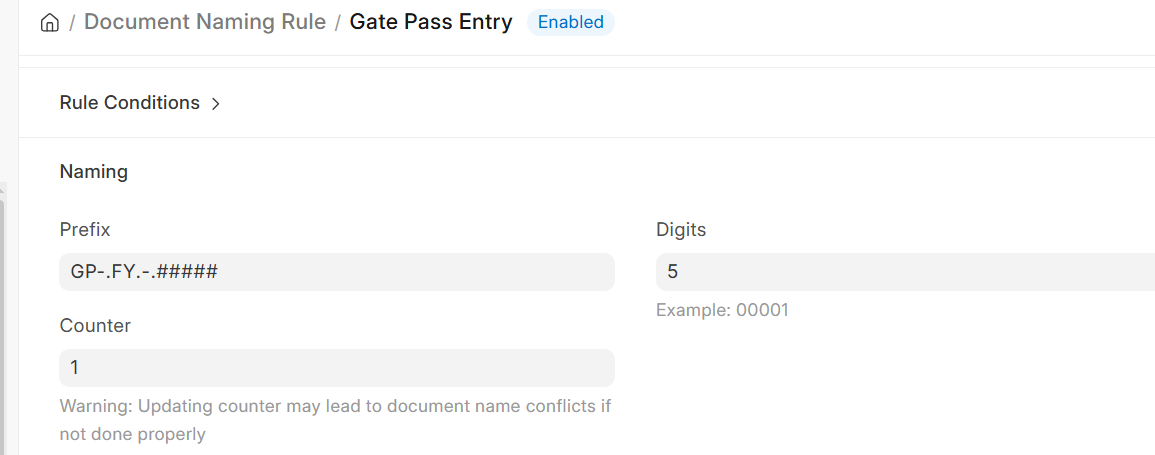
Example of an ERPNext Document Naming Rule with a financial-year-based prefix and five-digit sequence.
A Practical Example: A Growing Business in Chennai
Consider a Chennai-based manufacturing company that handles raw-material purchases, customer orders, deliveries, and invoicing every day.The purchase team creates dozens of Purchase Orders every week. The sales team creates Sales Orders and Quotations, while the accounts team handles Sales Invoices.Without a consistent numbering convention, employees may spend extra time identifying records.
Instead, the company could use patterns such as:
PO-2026-00045for Purchase OrdersSO-2026-00128for Sales OrdersINV-2026-00216for Sales InvoicesQTN-2026-00304for Quotations
Now, when someone sees PO-2026-00045, they already know what type of record it represents.
The numbering doesn't replace search, filters, reports, or other ERPNext features. It simply gives the document a useful identity from the moment it is created.
Can ERPNext Naming Series Be Customized?
Yes, but the level of customization depends on the requirement.
For straightforward needs, ERPNext's naming series settings can handle prefixes, sequential numbers, year-based patterns, and other supported patterns. The current value of an existing series can also be updated when there is a legitimate business reason to continue numbering from an earlier system.
For example, suppose a business has already created 322 Sales Orders in its previous system and wants ERPNext to continue from the next number. ERPNext provides a way to update the current value of the relevant series.There are also cases where businesses need numbering based on specific document information.
ERPNext's Document Naming Rule supports conditional naming based on document fields. For example, different prefixes can be applied depending on a field value, with rules evaluated according to their priority.This is useful for businesses with requirements involving multiple locations, categories, companies, or other conditions.If a requirement goes beyond the available configuration, additional ERPNext customization or development may be appropriate. This is where implementation planning matters.
At Tridots Tech, an ERPNext Gold Partner, these kinds of configuration decisions are considered as part of understanding how the business actually works rather than treating every company as having the same setup.
Common Mistakes to Avoid
A naming series is easy to overlook during an ERP implementation. A few practical mistakes are worth avoiding.
Making the numbering format too complicated
It can be tempting to put department codes, location codes, years, customer codes, product categories, and other information into one number.The result may look informative, but it can become difficult to maintain.A good numbering format should answer the basic identification need without becoming a puzzle.
Changing an active series without planning
Changing a numbering structure affects how users, reports, print formats, integrations, and existing processes refer to documents.ERPNext's current documentation specifically recommends checking related reporting, integrations, and print formats before changing an active series.
Treating numbering as an afterthought
Document numbering should be discussed during ERPNext implementation, not after everyone has started using the system.This is particularly important when migrating from software such as spreadsheets or another ERP. Existing numbering may need to be considered before deciding where a new series should begin.
Creating different conventions without a reason
If the sales team uses one pattern and the accounts team expects another, even a simple document lookup can become unnecessarily confusing.Consistency matters more than making the format clever.
Best Practices for ERPNext Naming Series
When setting up ERPNext document numbering, keep these practical points in mind:
Keep the format easy to read. People should understand the document number without needing a separate reference sheet.
Use meaningful prefixes.
INV,PO, andSOare easier to recognize than unexplained codes.Decide whether year-based numbering is useful. It can help businesses distinguish records across periods.
Think about future growth. A format that works for 100 documents may not be ideal when the business handles 100,000.
Test before going live. Create representative transactions and check the numbering alongside reports, print formats, and related workflows.
Plan around existing records. If you're moving from another system, decide how the new sequence should continue before migration is completed.
For businesses planning a broader ERP rollout, these details are best handled as part of the ERPNext implementation process rather than as a last-minute configuration task.
ERPNext Document Naming Is a Small Detail With a Daily Impact
Document numbering may not be the first thing a business thinks about when evaluating an ERP system.But it is something employees interact with constantly.Every time someone searches for an invoice, refers to a purchase order, checks a quotation, or asks another department to review a transaction, the document's identity matters.ERPNext gives businesses the flexibility to create naming series that fit their processes, while options such as conditional Document Naming Rules can handle more specific requirements.
The goal isn't to create the most complicated numbering system possible. It is to create one that makes sense for the business today and remains manageable as the business grows.That is also why ERPNext configuration deserves the same attention as module selection, workflows, and data migration.
If your business is planning an ERPNext implementation or needs help adapting ERPNext to an existing process, Tridots Tech can help you plan the setup around how your teams actually work. You can also explore our ERPNext customization services when your requirements go beyond standard configuration.
No comments yet. Login to start a new discussion Start a new discussion