How to Structure ERPNext for Multi-Plant Manufacturing Operations
When a manufacturer has 3 plants, 2 warehouses, and 1 ERPNext, everything depends on the right structure.
When a Manufacturer Has 3 Plants, 2 Warehouses, and 1 ERPNext — How Do You Structure It?
Most ERPNext implementation conversations start with modules — which ones to activate, which ones to skip. But for a manufacturer running multiple plants and warehouses, the first question is never about modules. It's about structure.
Get the structure wrong and everything downstream suffers. Reports don't add up. Stock levels look unreliable. Interplant transfers turn into a mess. And six months into go-live, someone is building a parallel spreadsheet to "just double-check" the numbers.
We've helped manufacturers set up ERPNext across multi-site operations more times than we can count. This is what we've actually learned — not theory, just what works on the ground.
First, Understand What You're Really Mapping
Before you open ERPNext, you need to be clear about one thing: what is each location actually responsible for?
A plant is where production happens. A warehouse is where stock sits. Those are different things — and ERPNext treats them differently. The mistake most businesses make is treating every location as a warehouse when some of them are really work-in-progress zones, staging areas, or finished goods holding bays inside a plant.
So start with a simple question for each location:
- Does it do production? (It's a plant)
- Does it store and dispatch stock? (It's a warehouse)
- Does it do both? (You'll need sub-locations inside it)
Once you're clear on that, ERPNext's Company → Warehouse hierarchy starts making a lot more sense.
The Company and Warehouse Structure
In ERPNext, everything sits under a Company. If all three plants operate under one legal entity, you have one company. If they're registered separately, you may need multiple companies — which is a bigger conversation involving inter-company transactions and consolidated reporting.
Assuming one company (which is the most common setup for a manufacturer with 3 plants), you'd create a warehouse structure that mirrors your physical reality. Something like:
- Plant A — Raw Material Store, WIP, Finished Goods
- Plant B — Raw Material Store, WIP, Finished Goods
- Plant C — Raw Material Store, WIP, Finished Goods
- Central Warehouse 1 — Finished Goods, Dispatch
- Central Warehouse 2 — Finished Goods, Dispatch
A Scalable ERPNext Structure for Multi-Plant Operations
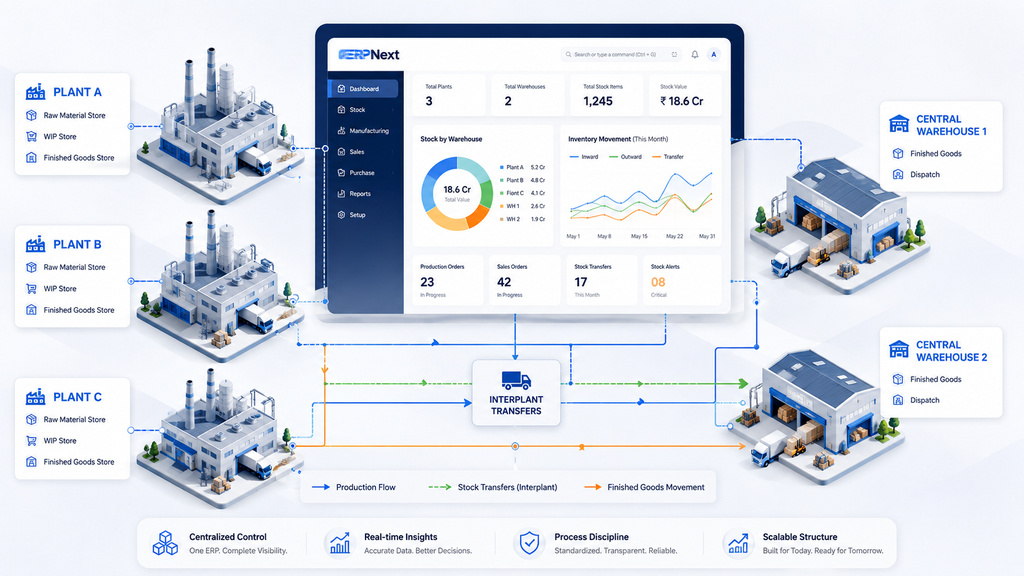
Example of how multiple plants and warehouses can be structured inside ERPNext for better stock visibility and operational control.
Each of these is a separate warehouse in ERPNext. Every stock entry, purchase receipt, and delivery note will specify exactly which warehouse it's affecting. That granularity is what makes multi-site reporting actually trustworthy.
How Production Orders Connect to Plants
Work Orders in ERPNext need a source warehouse (where you pull raw materials from) and a target warehouse (where finished goods land after production). For a multi-plant setup, this is where things either get clean or chaotic.
The clean approach: each plant's Work Orders are tied to that plant's own raw material and finished goods stores. Production at Plant A pulls from Plant A's RM store and deposits into Plant A's FG store. No ambiguity. No accidental stock mixing across sites.
The chaotic approach: sharing one common RM warehouse across all three plants. It seems simpler at setup but creates real confusion in practice — especially when you're trying to figure out why Plant B ran short of a material that Plant A consumed.
Interplant Transfers — Don't Wing This Part
When Plant A needs to send semi-finished goods to Plant C for further processing, that's a stock transfer. In ERPNext, you'd handle this through a Stock Entry with type "Material Transfer."
What trips people up is not doing this formally. Teams start moving stock physically without recording it in the system because it feels like internal movement. But to ERPNext, an unrecorded transfer means Plant A still shows that stock, and Plant C has nothing to work with.
The discipline of recording every interplant transfer — even small ones — is what keeps your stock reports honest. It's also what makes your cost accounting work correctly, which matters when you're evaluating which plant is actually profitable.
Warehouses and Dispatch Planning
Your two central warehouses likely serve different regions or customer segments. Structure them accordingly. If Warehouse 1 handles north India dispatches and Warehouse 2 handles south, reflect that in the naming and in how your sales orders route delivery.
ERPNext allows you to set a default warehouse at the customer level, which means once you've mapped this out, the system routes stock to the right dispatch point without manual selection every time.
Reporting Across Plants — The Payoff
Once the structure is clean, consolidated reporting across all three plants becomes straightforward. Stock ledger by warehouse, production summaries by plant, cost centre-wise P&L if you've mapped cost centres to each plant — all of it flows naturally from the foundation you built.
The businesses that struggle with multi-plant reporting almost always have one thing in common: they set up warehouses lazily at the start and then spent years trying to work around a structure that was never designed for their scale.
A Structure Question Worth Asking Before Go-Live
Before starting a multi-plant ERP setup, we always ask clients one important question:
"If your business adds another plant in the next five years, will this setup still work properly?"
If the answer is no, we redesign the structure. Because the goal is to create an ERP system that can grow along with the business — not one that needs major changes every time the business expands.
This kind of planning may not look exciting in demos, but it is very important. A strong ERP foundation helps businesses work smoothly and trust the system for the long term.
No comments yet. Login to start a new discussion Start a new discussion