ERPNext for Automotive Manufacturing: Managing Production, Inventory and Quality
ERPNext helps automotive manufacturers manage production, inventory, quality, and costs efficiently—all in one integrated system.
ERPNext for Automotive Manufacturing: Managing Production, Inventory and Quality
In automotive manufacturing, one missing component can delay an entire production line.
Imagine an automotive component manufacturer receiving an order for 1,000 brake assemblies.
The production team needs the right raw materials. The purchase team must ensure every component is available. The warehouse needs to track incoming and outgoing materials. The quality team must inspect the finished products before delivery.
Now, what happens if a critical component is unavailable? What if the stock records are incorrect? Or what if production takes longer than expected?
A small issue in one department can affect production schedules, delivery commitments and overall business performance.
This is why automotive manufacturers need more than just production software. They need a connected system that helps manage their entire business.
This is where ERPNext for Automotive Manufacturing becomes worth exploring.
What Is ERPNext for the Automotive Industry?
ERPNext is an open-source Enterprise Resource Planning (ERP) software that helps automotive manufacturers manage production, inventory, purchasing, sales, accounting and quality-related activities through one integrated platform.
From manufacturing individual automotive components to managing assembly operations, ERPNext provides tools to organise production activities and maintain visibility across business operations.
It connects different departments so that information recorded in one area can support activities in another.
For example, when a production requirement is created, businesses can plan material requirements, check stock availability and organise manufacturing activities using the relevant ERPNext workflows.
Why Do Automotive Manufacturers Need an ERP System?
Automotive manufacturing involves several interconnected processes. Manufacturers must manage raw materials, components, production schedules, machine operations, quality standards and customer orders.
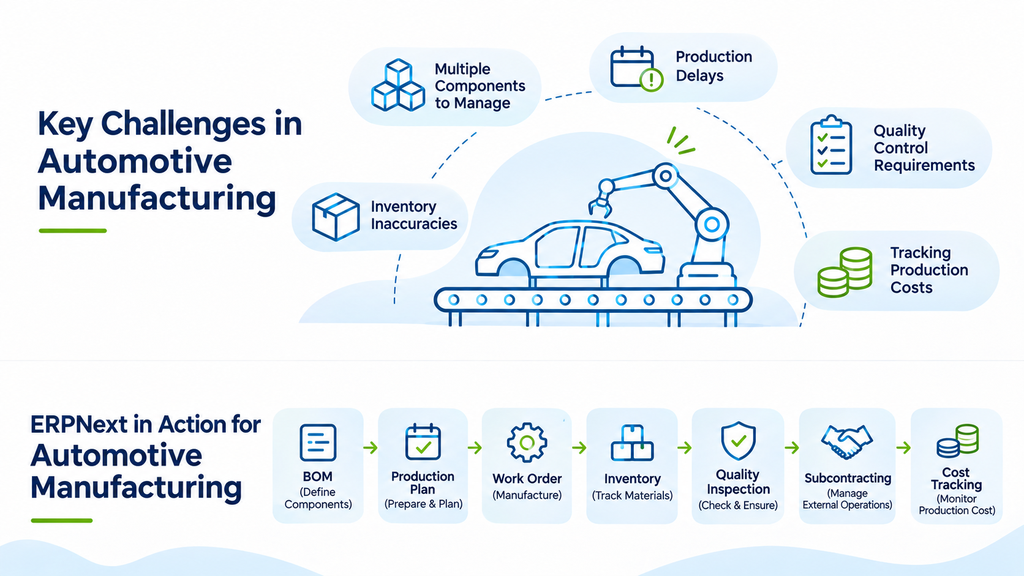
Some common challenges include:
1. Managing Multiple Components
An automobile or automotive component may require dozens or even hundreds of individual materials and sub-assemblies. Tracking every component manually becomes difficult as production grows.
2. Production Delays
A shortage of one essential component can interrupt an entire production schedule.
3. Inventory Inaccuracies
Manufacturers need to know how much raw material is available, what is reserved for production and what has already been consumed.
4. Quality Control Requirements
Automotive components must meet defined specifications. Missing inspection records or inconsistent quality checks can create problems during production and delivery.
5. Tracking Production Costs
Material consumption, labour, operational expenses and subcontracting costs all contribute to the final manufacturing cost.
An ERP system helps connect these activities and gives management a clearer view of business operations.
How Does ERPNext Support Automotive Manufacturing?
Let's look at some important ERPNext features and how automotive manufacturers can use them.
1. Bill of Materials (BOM): Manage Every Component
In automotive manufacturing, a finished product is often made up of several individual components and sub-assemblies.
For example, a brake assembly may require brake pads, calipers, pistons, springs, bolts and other components.
A Bill of Materials (BOM) defines the materials, quantities and operations required to manufacture a product.
ERPNext supports:
- Multi-level BOMs for products with sub-assemblies.
- Material quantity definitions.
- Operations and manufacturing instructions.
- Cost calculations based on configured material and operation costs.
This helps manufacturers maintain structured product specifications and use them during production planning.
2. Production Planning: Prepare Materials Before Production Starts
Production cannot begin just because an order has been received. Manufacturers must first understand whether the required materials and resources are available.
ERPNext's Production Plan helps manufacturers plan production based on demand and material requirements.
Businesses can use it to:
- Plan production against sales orders.
- Calculate required raw materials.
- Check available stock.
- Generate work orders.
- Create material requests for procurement.
This helps purchasing and production teams coordinate their activities before manufacturing begins.
3. Work Orders: Organise Manufacturing Activities
A Work Order defines what needs to be manufactured and the quantity required.
For example, if an automotive supplier receives an order for 500 engine mounting brackets, the production team can create a work order for that quantity using the relevant BOM.
The work order helps define manufacturing requirements and connects production with material consumption and operations.
This makes it easier to organise manufacturing activities and track the progress of production jobs.
4. Inventory Management: Track Every Important Component
Automotive manufacturers depend on the availability of the right materials at the right time.
ERPNext's Stock module helps businesses manage:
- Raw materials and purchased components.
- Work-in-progress inventory.
- Finished automotive components.
- Warehouse-wise stock levels.
- Material transfers and consumption.
- Batch and serial number tracking, where applicable.
With connected inventory and manufacturing records, businesses can better understand material availability and movement across their operations.
5. Workstations and Job Cards: Monitor Shop-Floor Operations
Automotive production often involves multiple stages, such as cutting, machining, welding, assembly and finishing.
ERPNext provides Workstations and Job Cards to help manage these operations.
Workstations represent the machines or production locations where work is performed.
Job Cards record the progress of individual manufacturing operations, including time and operation-related details.
This gives production managers better visibility into the activities taking place on the shop floor.
6. Quality Inspection: Maintain Component Quality
In automotive manufacturing, quality is not something that can be checked only at the end of production.
Components may need inspection when they arrive from suppliers, during manufacturing or before dispatch.
ERPNext provides Quality Inspection features that allow businesses to define inspection parameters and record inspection results.
Manufacturers can use these records to monitor whether materials and finished products meet their specified quality requirements.
For businesses with strict automotive quality requirements, additional quality workflows and integrations may be needed depending on their certification and compliance needs.
7. Subcontracting: Manage External Manufacturing Activities
Many automotive manufacturers outsource certain operations to external vendors.
For example, a company may send metal components to another supplier for surface treatment, painting or specialised machining.
ERPNext supports subcontracting workflows that help businesses manage materials supplied to subcontractors, finished items received and related transactions.
This provides better visibility into outsourced production activities and material movement.
8. Accounting and Manufacturing Cost Tracking
Manufacturing costs are not limited to raw materials.
Businesses must also consider operational expenses, labour, subcontracting and other production-related costs.
ERPNext connects manufacturing, stock and accounting transactions to support inventory valuation and manufacturing cost tracking.
This helps businesses maintain financial records and understand the cost impact of their production activities.
What Makes ERPNext a Strong Choice for Automotive Manufacturers?
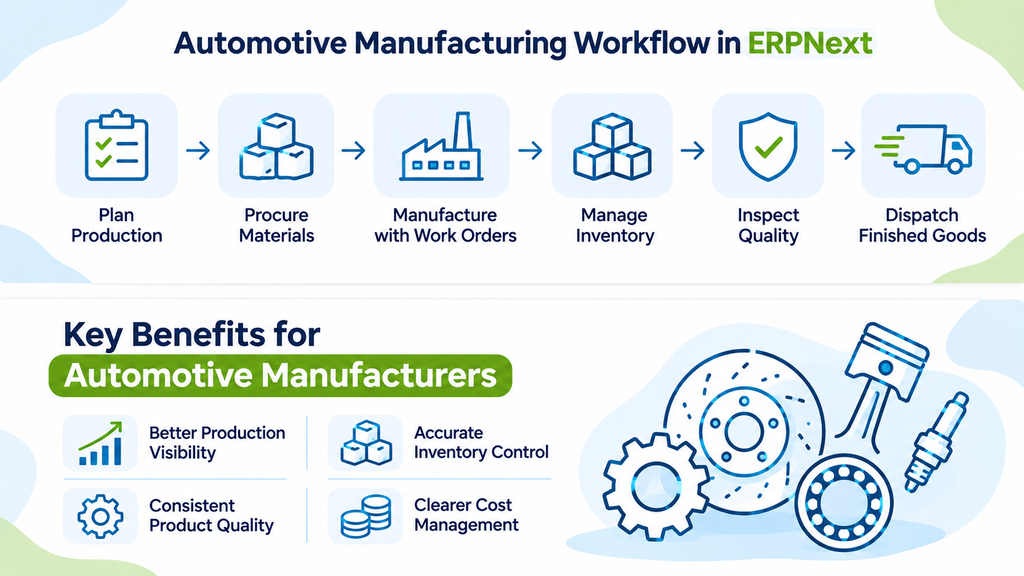
Automotive manufacturing requires coordination across multiple departments. ERPNext brings these essential business functions together in one integrated platform.
Here is how manufacturers can use it:
Component and Assembly Management
Use multi-level Bills of Materials (BOMs) to define components, sub-assemblies and material requirements.
Production Planning
Plan manufacturing requirements, check material availability and prepare production schedules using Production Plans.
Manufacturing Operations
Organise production activities and track manufacturing progress through Work Orders, Workstations and Job Cards.
Inventory Management
Monitor raw materials, work-in-progress items and finished goods across different warehouses.
Quality Management
Record inspection parameters and results to support quality checks at different stages of manufacturing.
Subcontracting Management
Manage materials sent to external vendors and finished products received after outsourced operations.
Manufacturing Cost Tracking
Connect manufacturing, inventory and accounting transactions to maintain better visibility into production-related costs.
Beyond these features, ERPNext offers:
- Open-source flexibility: Customise the platform according to business requirements.
- Connected operations: Manage manufacturing, purchasing, sales, inventory and accounting within one ERP system.
- Custom workflows: Adapt processes, reports and configurations to suit production requirements.
- Scalability: Extend ERP capabilities as business operations grow.
The real advantage is not simply having all these features. It is having them configured to work together according to the manufacturer's actual business processes.
Is ERPNext Suitable for Automotive Component Manufacturers?
Yes. ERPNext can support various automotive manufacturing activities, including:
- Automotive spare parts manufacturing.
- Engine and transmission component manufacturing.
- Sheet metal fabrication.
- Machining and precision engineering.
- Electrical and electronic component manufacturing.
- Automotive assembly operations.
- Subcontracted manufacturing.
For example, an automotive component manufacturer producing engine brackets can use BOMs to define material requirements, Production Plans to prepare manufacturing requirements, Work Orders to organise production and Quality Inspections to record product checks.
The exact workflow will depend on the product, production method and quality requirements.
Why Does the Right ERPNext Implementation Partner Matter?
Selecting an ERP system is only one part of the process.
Automotive manufacturers may have complex production workflows, multiple warehouses, different units of measurement, subcontracting requirements and specific quality procedures.
Simply installing ERP software will not address these requirements automatically.
A successful implementation requires:
- Understanding existing manufacturing processes.
- Configuring BOMs and production workflows.
- Setting up inventory and warehouse structures.
- Defining quality inspection procedures.
- Configuring accounting and costing requirements.
- Training employees to use the system effectively.
The implementation should reflect how the factory operates in reality.
How Tridots Tech Supports Automotive Manufacturing Businesses
At Tridots Tech, we help businesses implement and customise ERPNext based on their operational requirements.
Our ERPNext services include:
- ERPNext implementation and configuration.
- Manufacturing module setup.
- BOM and production workflow configuration.
- Inventory and warehouse management.
- Custom reports and manufacturing workflows.
- ERPNext integrations and application development.
- Cloud deployment, maintenance and support.
We focus on understanding each business's requirements and configuring ERPNext to support its actual operations.
Whether you manufacture automotive components, spare parts or industrial assemblies, the right ERP implementation can help bring better visibility and coordination to your business processes.
Frequently Asked Questions About ERPNext for Automotive Manufacturing
1. Can ERPNext be used for automotive manufacturing?
Yes. ERPNext includes manufacturing, inventory, purchasing, accounting and quality management features that can support automotive component and assembly manufacturing.
2. Does ERPNext support multi-level BOMs?
Yes. ERPNext supports multi-level Bills of Materials, allowing manufacturers to manage products containing multiple sub-assemblies and components.
3. Can ERPNext track automotive components?
Yes. ERPNext supports inventory tracking using warehouses, batches and serial numbers, where applicable.
4. Can ERPNext manage subcontracted automotive production?
Yes. ERPNext provides subcontracting functionality to manage materials supplied to external manufacturers and finished products received from them.
5. Does ERPNext support quality inspection?
Yes. ERPNext provides Quality Inspection functionality to record inspection parameters and results for applicable materials and products.
6. Can ERPNext be customised for automotive manufacturers?
Yes. ERPNext can be extended and customised to accommodate specific manufacturing workflows, reports, integrations and business requirements.
Final Thoughts
In automotive manufacturing, every component matters. Every production stage matters. And every delay can affect the next step.
Managing these activities with disconnected systems can make it difficult to maintain a clear picture of what is happening across the factory.
ERPNext brings manufacturing, inventory, purchasing, quality and accounting into one connected platform.
For automotive manufacturers looking to improve production visibility, manage components effectively and organise their operations, ERPNext is worth exploring.
Planning to implement ERPNext for your automotive manufacturing business?
Let's understand your manufacturing requirements and explore the right ERPNext solution for your business.
No comments yet. Login to start a new discussion Start a new discussion