Job Cards vs Work Orders in ERPNext: What's the Difference and When Should You Use Each?
Understand the difference between Job Cards and Work Orders in ERPNext and learn how they work together to improve manufacturing planning and shop floor execution.
Manufacturing involves much more than producing a finished product. Every order goes through planning, material preparation, multiple production stages, and final completion. As production volumes increase, businesses need better visibility into every step of the process.
Imagine your factory receives an order to manufacture 500 office chairs. The production manager knows what needs to be produced and by when. But the shop floor team needs more detailed information. Which operation should start first? Which workstation is responsible? Who will perform the task? How long should each operation take?
This is why ERPNext uses both Work Orders and Job Cards. Although they are closely related, they are designed for different purposes. A Work Order plans and manages the overall production, while Job Cards help execute and record each manufacturing operation on the shop floor.
Many manufacturers using ERPNext for the first time assume these documents perform the same function. In reality, understanding the difference helps businesses improve production tracking, monitor operational performance, and gain better control over manufacturing.
In this blog, we'll explain how Work Orders and Job Cards work together in ERPNext, when each should be used, and why both are important for an efficient manufacturing process.
Why Do People Get Confused?
One of the most common questions during an ERPNext implementation is:
"If ERPNext already has Work Orders, why does it also need Job Cards?"
It's a fair question because both documents belong to the Manufacturing module and are used during production.
Businesses often wonder:
- Aren't they the same?
- Can I manufacture products using only Work Orders?
- Why are Job Cards created automatically?
- Do I really need Job Cards for every production order?
The answer is simple.
A Work Order focuses on planning the manufacturing process, while a Job Card focuses on carrying out each operation on the shop floor. Think of a Work Order as the production plan and a Job Card as the record of how that plan is executed.
What Is a Work Order in ERPNext?
A Work Order is the document that initiates and manages the manufacturing of a product. It tells ERPNext what needs to be manufactured and provides the information required before production begins.
A Work Order typically includes:
- Item to be manufactured
- Quantity to produce
- Bill of Materials (BOM)
- Required raw materials
- Planned operations
- Production schedule
- Source warehouse
- Target warehouse for finished goods
Depending on your manufacturing process, Work Orders can be created manually, from a Production Plan, or directly from a Sales Order. Once submitted, ERPNext uses the Work Order to manage production, reserve or transfer materials, monitor manufacturing progress, and eventually produce the finished goods.
However, a Work Order focuses on the production order as a whole. It doesn't record what happens during each individual operation. That's where Job Cards become important.
What Is a Job Card in ERPNext?
A Job Card is created from a Work Order when manufacturing operations are defined in the BOM or Routing. Instead of managing the entire production process, it focuses on one specific manufacturing operation.
For example, if producing a product involves Cutting, Welding, Painting, Assembly, and Inspection, ERPNext can automatically create a separate Job Card for each operation after the Work Order is submitted.
A Job Card records important operational details such as:
- Operation name
- Assigned workstation
- Employee or operator
- Start and end time
- Time logs
- Completed quantity
- Scrap quantity (if applicable)
- Quality inspection reference (optional)
Because Job Cards capture what actually happens during production, they help manufacturers track labor, monitor machine usage, and measure the time taken for every operation. Simply put, if a Work Order answers "What are we manufacturing?", a Job Card answers "How was each operation completed?"
Work Order vs Job Card: A Quick Comparison
| Work Order | Job Card |
|---|---|
| Plans the overall manufacturing process | Executes and records individual operations |
| Created before production begins | Generated from the Work Order when operations are defined |
| Covers the complete production order | Covers one operation at a workstation |
| Focuses on materials, quantity, and production planning | Focuses on labor, time, and operational execution |
| Tracks overall production progress | Tracks the progress of each operation |
Both documents work together. One does not replace the other.
From One Work Order to Multiple Job Cards
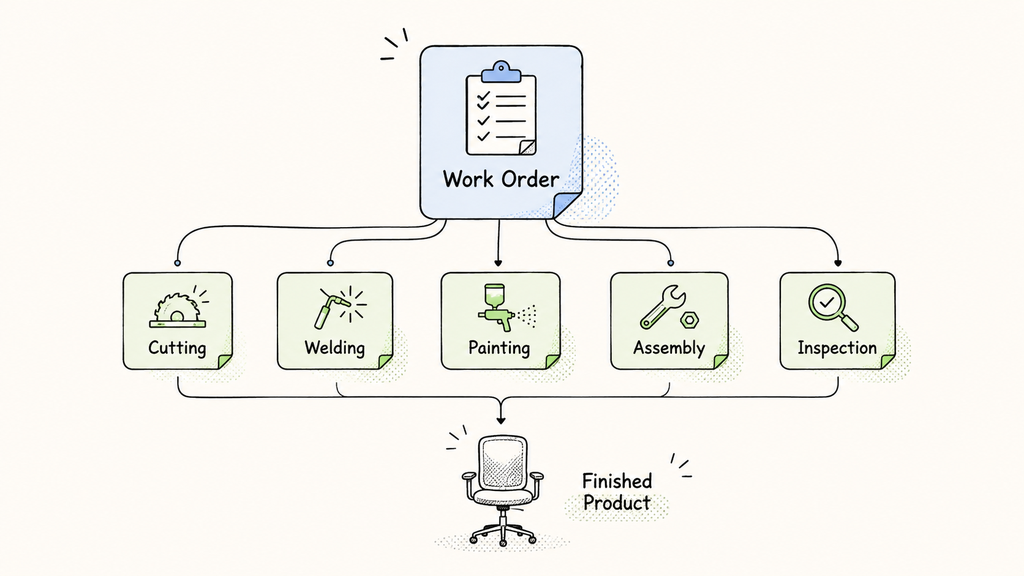
Figure 1. A single Work Order in ERPNext can generate multiple Job Cards for different manufacturing operations. Each Job Card records the execution of one operation before the finished product is completed.
A Practical Manufacturing Example
Let's understand this with a simple example.
A furniture manufacturer receives an order to produce 500 office chairs.
The manufacturing process includes:
- Cutting
- Welding
- Painting
- Assembly
- Final Inspection
The production manager creates a Work Order in ERPNext to manufacture 500 office chairs.Once the Work Order is submitted, ERPNext automatically generates separate Job Cards for every operation defined in the BOM or Routing, allowing each workstation to record its progress independently.
Production Workflow
Work Order
    ↓
Cutting
    ↓
Welding
    ↓
Painting
    ↓
Assembly
    ↓
Final Inspection
Each workstation records the actual start time, end time, completed quantity, and any scrap generated. As every Job Card is completed, the Work Order reflects the production progress until the finished goods are manufactured and inventory is updated.
How Work Orders and Job Cards Work Together
A typical ERPNext manufacturing process follows this sequence.
ERPNext Manufacturing Workflow
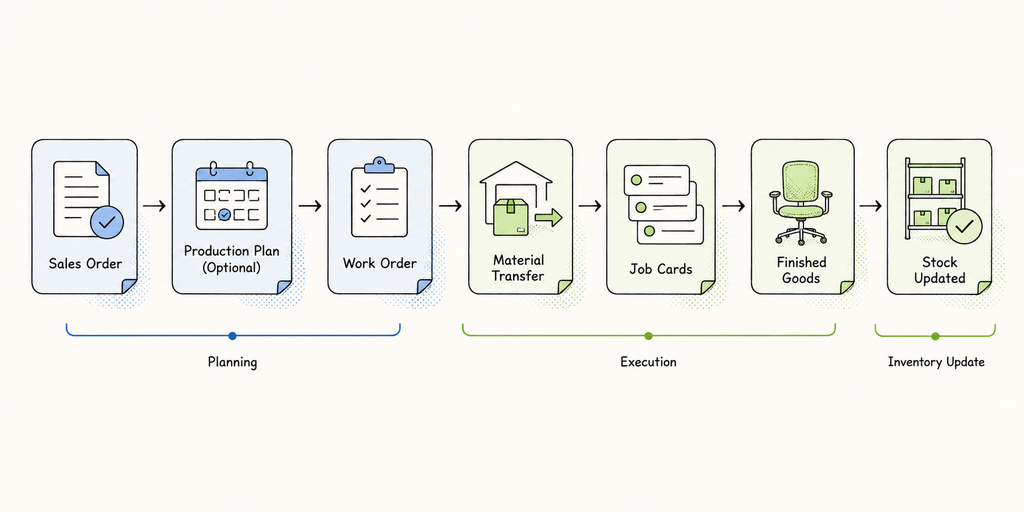
Figure 2. A simplified ERPNext manufacturing workflow showing how production moves from Sales Orders and Production Planning to Work Orders, Job Cards, Finished Goods, and inventory updates.
The workflow is:
Sales Order
      ↓
Production Plan (Optional)
      ↓
Work Order
      ↓
Material Transfer
      ↓
Job Cards
      ↓
Finished Goods
      ↓
Stock Updated
The Work Order acts as the production plan, while Job Cards ensure every manufacturing operation is completed and recorded correctly.
Together, they give manufacturers better visibility into production by helping answer questions such as:
- Which workstation is currently working on the order?
- Which operations have been completed?
- How much time did each operation take?
- Which employee performed the work?
- Where is production currently delayed?
- Was any scrap generated?
When Can You Use Only Work Orders?
Small manufacturers with a single workstation, simple production processes, and limited product variations may choose to manage production primarily through Work Orders.
However, as manufacturing becomes more complex, Job Cards provide the operational visibility needed to manage production efficiently.
When Do Job Cards Become Essential?
Job Cards become especially valuable when your business needs:
- Multiple workstations
- Multiple operators
- Labor costing
- Time tracking
- Capacity planning
- Machine utilization monitoring
- Employee productivity analysis
- Operation-wise production status
- Scrap tracking
- Quality checks
Best Practices for Using Work Orders and Job Cards
To get the most value from ERPNext Manufacturing, consider these best practices:
- Define clear manufacturing operations in your BOM or Routing.
- Assign the correct workstation for every operation.
- Record actual production time using Job Cards.
- Review Work Order progress regularly.
- Use Job Card data to improve labor planning and production efficiency.
Conclusion
Work Orders and Job Cards are designed to work together—not compete with each other. A Work Order tells your team what needs to be manufactured, while a Job Card records how each manufacturing operation is completed, giving you complete visibility from planning to shop floor execution.
Whether you're implementing ERPNext or improving an existing manufacturing process, understanding how these two documents work together is essential. At Tridots Tech, we help manufacturers configure ERPNext to fit their production workflows, making every stage of manufacturing connected, measurable, and easier to manage.
No comments yet. Login to start a new discussion Start a new discussion