Tally to ERPNext Migration: How to Do It Without Data Loss
Moving from Tally to ERPNext doesn’t mean leaving years of business data behind. With the right planning, you can migrate your records safely and start managing your business in one connected system.
How to Migrate from Tally to ERPNext Without Losing Business Data
A company has used Tally for ten years. The finance team knows it inside out. Every customer ledger, every purchase entry, every year's closing balance sits in that system, familiar and trusted. Then the business grows. Someone starts asking for inventory tracking across three warehouses, a CRM to manage a growing sales pipeline, or a single dashboard that shows finance and operations together. Tally was never built for that, and the conversation about ERPNext begins.
The moment that conversation starts, one question always comes up first: "If we move from Tally to ERPNext, what happens to all our existing data?"
It's a fair concern. Years of transactions, customer relationships, and financial history aren't something any business wants to gamble with. The good news is that a Tally to ERPNext migration, done properly, doesn't mean losing that history. It means moving it carefully, with enough planning that nothing important falls through the cracks.
Why Businesses Move from Tally to ERPNext
Tally is a solid accounting tool, and for many small businesses, it does exactly what's needed. But as operations get more complex, gaps start to show.
A business selling from multiple locations may need centralized stock visibility that Tally doesn't offer. A company handling purchase approvals across departments may be stuck emailing spreadsheets back and forth. A sales team without a CRM might be tracking leads in notebooks or personal files. A manufacturer may need to track raw materials, work orders, and finished goods together, not as separate, disconnected records.
ERPNext brings accounting, inventory, purchasing, sales, CRM, manufacturing, HR, and project management into one system. That means less duplicate data entry — a sales order can flow into an invoice, and stock levels can update without someone re-typing numbers into three different tools.
This doesn't mean every business using Tally should switch. A small trading firm with straightforward accounting needs may be perfectly served by Tally for years to come. The decision to migrate should come from actual operational requirements — multiple departments needing shared data, growing transaction volume, or the need for better reporting — not from the assumption that newer is automatically better.
Can Tally Data Be Migrated to ERPNext?
Yes, Tally data can be migrated to ERPNext. But it's worth being clear about something: not everything sitting in Tally should be moved over automatically, and not everything moves in a simple one-step transfer. Migration works best when a business first decides what actually needs to make the journey.
It helps to think about Tally data in three broad categories.
Master data
This includes customers, suppliers, items, ledger accounts, employees, and warehouses. These are the building blocks of daily transactions, and they usually form the foundation of the migration.
Transactional data
Sales invoices, purchase invoices, payment entries, stock movements, and journal entries fall here. This is where most of a company's day-to-day business activity lives.
Historical data
Old transactions, closed financial years, and archived records need a separate decision. Some businesses migrate several years of history. Others prefer to bring over opening balances and start fresh in ERPNext for day-to-day operations, keeping old Tally data accessible separately for reference or audit purposes.
There's no single right answer here — it depends on statutory requirements, how often historical data is actually referenced, and how much value it adds versus the effort of migrating it.
How the Tally to ERPNext Migration Process Works
A reliable migration follows a sequence. Skipping steps is usually where data problems start.
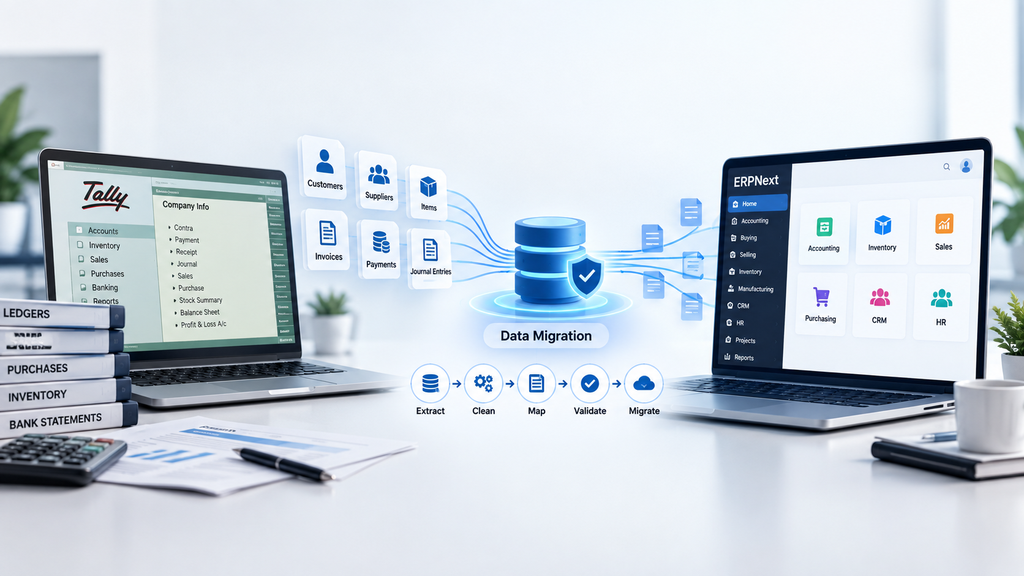
1. Understand the existing Tally setup
Before anything is moved, the team needs to understand how the company currently uses Tally — the chart of accounts, how masters are named, any custom voucher types, and the actual business processes behind the numbers. This step is less about the software and more about understanding how the business runs.
2. Clean and prepare the data
Years of manual entry almost always leave behind duplicates, inactive customers, incomplete records, or inconsistent naming. A common example: Tally might have "ABC Traders," "A.B.C. Traders," and "ABC Traders Pvt Ltd" as three separate entries, when they're actually the same company. Before migration, someone needs to review this and decide whether these should be merged into a single customer record in ERPNext. Skipping this step just means carrying the same mess into the new system.
3. Map Tally data to ERPNext
Data mapping simply means deciding where each piece of Tally data belongs in ERPNext. A Tally customer becomes an ERPNext Customer. A Tally item becomes an ERPNext Item. A Tally supplier becomes an ERPNext Supplier. It sounds straightforward, but the mapping isn't always one-to-one — some businesses have account structures or item classifications that need custom fields or configuration in ERPNext to represent properly.
4. Configure ERPNext
ERPNext needs to reflect how the business actually operates before final data goes in. This usually touches company setup, the chart of accounts, warehouses, tax rules, user roles, and the buying, selling, and stock modules. What gets configured varies a lot from one company to another, so this isn't a one-size-fits-all checklist — it's shaped by the business itself.
5. Test migration
A test migration, using a copy of the real data, should happen before anything is finalized. This is where the team checks record counts, opening balances, customer and supplier balances, inventory quantities, outstanding invoices, and whether reports look correct.
6. Validate the migrated data
Getting data into ERPNext isn't the finish line. It has to be checked against the original Tally records — line by line where necessary — to confirm it's accurate and actually usable for daily operations, not just present in the system.
7. Final migration and go-live
Once testing and validation are done, the final migration happens with a controlled cutover — a clear point in time after which Tally is no longer updated and ERPNext takes over. This prevents transactions from being entered in one system and missed in the other during the transition.
A Practical Example
Consider a growing distribution company that has used Tally for several years and has built up thousands of customer records, supplier accounts, items, invoices, and payment entries.
A sensible approach would look like this: review the existing Tally data and identify duplicate or outdated entries, clean and consolidate customer and supplier lists, map the cleaned masters to ERPNext, configure ERPNext to match the company's actual accounting and inventory structure, run a test migration, and compare the results against the original Tally reports — checking balances, stock quantities, and open invoices. Once everything checks out, the final migration happens, followed by user training and a planned go-live date.
This is an illustrative example rather than a specific client case, but it reflects the kind of structured approach that reduces risk during a real migration.
How to Avoid Losing Data During Tally to ERPNext Migration
The biggest safeguard is simple: never touch the original Tally data until a secure backup exists. Any migration should start from a copy, not the live file.
Beyond that, it helps to clearly define what data actually needs to move, rather than migrating everything by default. Clean and validate the data before import, and keep field mapping documented so there's no ambiguity about where each type of record ends up in ERPNext.
Test migrations matter more than they might seem. Running one first, and reconciling account balances, inventory figures, and outstanding invoices between Tally and the test ERPNext instance, catches problems while they're still easy to fix. A documented migration checklist keeps the process consistent, especially if more than one person is involved.
Finally, the cutover to ERPNext should be planned, not rushed — with a clear date after which Tally entries stop and ERPNext takes over completely. And before calling the migration done, it's worth having actual users from finance and operations check the records they rely on daily. They'll often spot inconsistencies a technical checklist misses.
What Data Should You Migrate from Tally to ERPNext?
| Data Category | Examples | Migration Consideration |
|---|---|---|
| Customers | Names, contact details, billing info | Clean duplicates and inconsistent naming before mapping |
| Suppliers | Vendor records, payment terms | Verify active vs. inactive suppliers |
| Items | Products, SKUs, units of measure | Check if item classification needs ERPNext-specific structuring |
| Chart of Accounts | Ledger groups, account heads | May need remapping to fit ERPNext's accounting structure |
| Opening balances | Account and party balances | Must reconcile carefully to avoid financial discrepancies |
| Sales transactions | Invoices, sales orders | Decide how much transaction history is genuinely needed |
| Purchase transactions | Purchase invoices, orders | Same consideration as sales history |
| Payments | Receipts, payment entries | Should tie back to correct invoices post-migration |
| Inventory | Stock quantities, warehouse data | Validate quantities against physical stock where possible |
| Historical records | Past financial years | Decide based on audit and reporting requirements |
The right scope depends on the company's data volume, how the existing records are structured, and what the business actually needs going forward.
Why Professional ERPNext Migration Support Matters
A Tally to ERPNext migration touches accounting accuracy, inventory records, and daily business operations at the same time. That's a lot to get right without experience in both systems.
An experienced migration partner typically helps with assessing what data exists and what condition it's in, planning the migration sequence, mapping data correctly, configuring ERPNext to match real business processes, handling customization where the business genuinely needs it, managing integration requirements with other tools, running proper testing, validating results, training users, and supporting the go-live period.
Tridots Tech, as a Frappe-certified ERPNext Gold Partner, works with businesses through exactly this kind of structured migration process — understanding what a company currently has in Tally before deciding how it should look in ERPNext.
Conclusion
Moving from Tally to ERPNext does not have to mean abandoning years of business data. A well-planned migration comes down to understanding what data exists, cleaning it up, mapping it correctly to ERPNext, testing thoroughly, reconciling the numbers that matter, and validating everything before the switch is final.
If your business is weighing a move from Tally to ERPNext and wants to think through what that would actually involve, the Tridots Tech team is happy to have that conversation and look at what your migration would realistically require.
No comments yet. Login to start a new discussion Start a new discussion